.png)
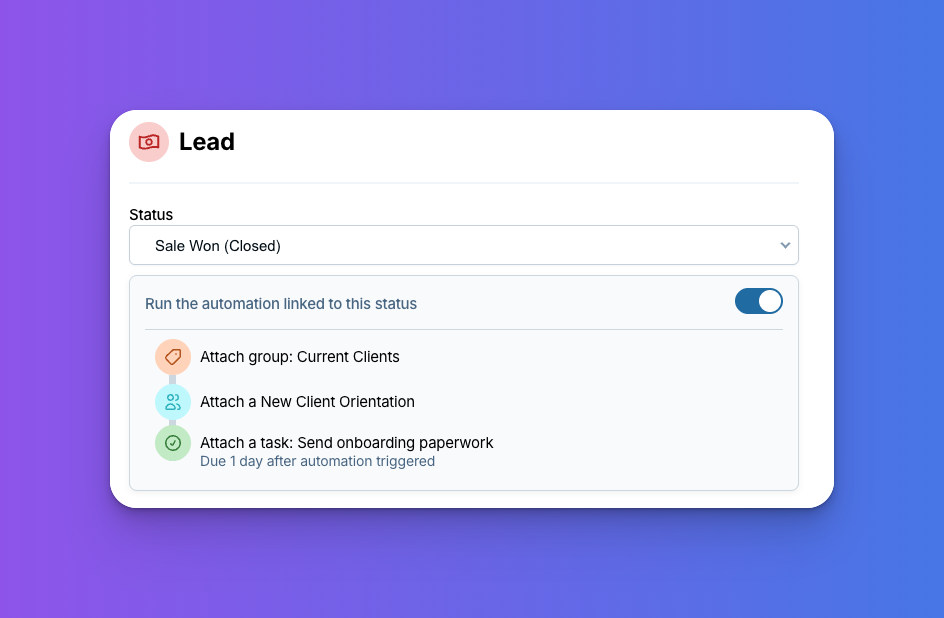
Did you know a single automation can run several steps at once? Just change a contact's pipeline status, and the CRM can update their pipeline, add them to a group, and set you a task automatically, all from just the click of a button. That's what makes automations so handy at the moments your process moves a contact from one phase to the next.
If you haven't tried them yet, an automation is just a set of steps you define once and then let run automatically whenever something happens, like a contact moving to a new pipeline status. The simplest version is a single reminder: attach a follow-up task so a lead doesn't sit untouched in your pipeline for weeks. That alone is worth setting up! But you can also stack several steps into one automation, so a single trigger kicks off the whole sequence at once.
Where things slip through the cracks
When you're running the show yourself, every stage of a deal lands on your plate. Closing a sale is really the start of a new phase more than a finish line. One minute you're wrapping up a sale, and the next you're the one who has to onboard, set up, and welcome that new client! The tricky part is that the transition between those two jobs usually lives in your head.
After you mark a deal as won, you probably need to:
- Move the contact out of your sales pipeline and into an onboarding pipeline
- Set yourself a task to actually kick off onboarding, with a deadline so it doesn't drift
Those are separate steps, every single time, and each one depends on you remembering to do it. And when you're busy (which, as a small business or team of one, is pretty much always), it's easy for something to slip. The client sits in your "Won" column while you're heads-down on the next deal, and all that warm momentum you built during the sale starts to cool. That's the kind of gap that can make a brand-new customer second-guess their decision.
One automation, the whole sequence
Instead of relying on memory, you can build a single automation that runs every step the instant a contact reaches that transition point. Here's how it comes together:
- Find the status that marks the transition. This is usually a stage like "Won," "Signed," or "Ready for onboarding," whatever point in your process means it's time to move from selling to delivering.
- Add the automation to that status. Click into the status and start building. Instead of choosing just one action, you'll add a few.
- Update the pipeline. Add a step that moves the contact into your onboarding pipeline (or wherever the next phase lives), so they show up in the right place and don't get lost among your active deals.
- Add them to a group. Add a step that drops the contact into a group like "current clients," so they're easy to find later when you want to export a list of everyone you're actively working with and email them.
- Attach a task with a deadline. Add a step that creates your "start onboarding" task and sets a due date, so the next phase actually makes it onto your calendar instead of slipping your mind.
Once it's built, you don't have to think about any of it again! The moment you drop a contact into that status, the whole sequence fires: they land in the right pipeline, join the right group, and a task pops up on your workspace letting you know it's time for the next step.
The same trick works for any transition
Closing a deal is the most common example, but you can use this anywhere your process moves a contact from one phase to the next:
- 🛡️ Lead to policy. Insurance agents can move a lead into their active policy pipeline the moment they sign on, so renewals and service never get missed.
- 🛍️ Lead to the right product pipeline. When someone buys, move them into a pipeline based on the product they purchased, so your follow-up always matches what they actually bought.
- 🔄 Onboarding to ongoing. Once a client is up and running, move them into a pipeline for regular check-ins so they don't go quiet.
- ✅ Project to wrap-up. When the work is delivered, queue up the steps for invoicing, a testimonial request, or a follow-up down the road.
For any of these, the recipe is the same! Pick the status that marks the transition, then stack the steps that should happen.
Pipelines are just the start
Moving a contact through a pipeline is one way to kick off an automation, but it's far from the only one. You can also connect an automation to our form tool, so that when someone fills out one of your forms, the steps run automatically. That makes it easy to drop a new lead into the right pipeline, add them to a group, and set yourself a follow-up task the moment they reach out, before you've even seen the submission.
And you don't have to tie an automation to a pipeline or a form at all. You can build one as a standalone set of steps and run it manually whenever you like, which is handy for the multi-step tasks you do over and over but don't want to click through by hand each time. Think of automations as building blocks you can use all over the CRM, not just at pipeline transitions.
Working with a team? It scales up too
If you've got other people on your account, the same automation can assign that task to a different user instead of yourself. It's a great way to pass the baton from whoever closes the deal to whoever handles onboarding. The contact lands in the right pipeline, and the right teammate gets a task letting them know it's their turn, with no manual handoff required. But you definitely don't need a team to get the benefit. The real win is that your process happens the same way every time, whether one person is driving or five.
Why it's worth setting up
A good automation does three things for you. It keeps your process consistent, so it happens the same way every time no matter how busy you are. It keeps your momentum going, so contacts move forward instead of stalling between stages. And it takes that mental checklist off your plate, so you can focus on the work that actually needs you.
Best of all, you build it once! Spend a few minutes mapping out what should happen at your most important transition, set it up, and let it run quietly in the background from then on.
Sign up to receive updates in your inbox